Categories
Tech

My recent switch to Verizon Wireless

After over ten years of being a Sprint customer I have switched to Verizon. I started to sway a couple of months ago I tried out a demo line of a Motorola Droid Bionic and was very impressed with the 4G LTE coverage and speeds. Everywhere that I went that had Verizon coverage in town, I had 4G coverage. Coming from the 2.5Ghz spectrum that Sprint uses for their Wi-Max coverage and lack of building penetration, this was quite a treat.

A few weeks later, I met my brother Stan for some drinks and ran a speed test on his phone and pulled over 25Mbps down which is pretty amazing! I was struggling with the cost increase that a switch from Sprint but was very tempted with the network. Another example is at our family cabin, I have fought with poor coverage for years while this last summer I saw our neighbors making calls and streaming Slacker music on 3G without issue.

Verizon has been extremely agressive in their rollout of their LTE network and says that they will have their existing 3G coverage map completely covered with 4G LTE by the end of 2013. There is speculation that Verizon will then aggressively push for voice over LTE at that time and repurpose the 3G spectrum over time for additional LTE capacity.

This article written over a year ago shows the difference between Verizon’s 4G coverage at that time versus Sprint’s which has not grown much in the Twin Cities over the past year.

image

Shown below is the coverage growth over the last few months from early November 2011 through mid December 2011

Most of 2011…

image

November 17th growth

image

December growth – new markets in Duluth and Rochester

image

Verizon is not shy about showing off their coverage difference with Sprint as they have the following sign in stores

image

Sprint is working on their Network Vision roll out which is a great plan that leverages partners to help them build out their network. This deployment is supposed to be completed around the end of 2013. The re-purposing of the iDen spectrum will prove to be a great asset to Sprint’s 4G expansion. I am very excited to see what they have to offer at that time because I love their open model and pricing. This post is to no way rip on Sprint. I feel that they are still a great carrier with a very strong pricing advantage and because of that, I will continue to recommend Sprint to people. I have multiple family members on Sprint and I would not try to convince them to switch. For a power user like myself, I found the current 4G footprint too limiting and am paying for it every month with Verizon.
Categories
Tech

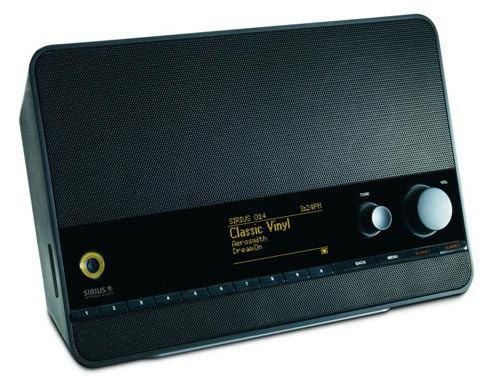
SiriusXM TTR1 Internet Tabletop Radio Review

image

For Christmas I recieved the SiriusXM TTR1 Tabletop Internet radio. This radio can play all of SiriusXM’s online content which includes music, talk, comedy, sports, play by play, etc.

Cost
We purchased the TTR1 radio on the SiriusXM site for about $75 on sale which is the lowest that I had seen this model which usually sells for around $119-149.

Sound Quality
Sound quality on this little radio is pretty good for the cost. Since I most often listen to talk radio the sound quality is not always a concern but it is nice to know that it can pump out some quality sounding tunes when I listen to music. I really enjoyed this radio in the living room with Christmas music on and more recently in the bathroom so that I can listen to Opie and Anthony and sports radio in the morning while getting ready for work instead of listening on my phone like I have for the last few years.

Setup and Features
I started setup by entering in our WPA passphrase which was not exactly fun with having to dial through the alphabet. Once I had the wireless connection configured, I was able to enter my SiriusXM credentials and all of the available channels populated in the menus. There is an option for wired Ethernet connections, a line out, and an AUX connection for when you want to use another source for audio. There are also alarm clock capabilities in the TTR1 if someone were to use this device in their bedroom.

Interface
There is a main menu that is driven through a dial that pushes in for confirmation. The dial can be a little clumsy when making choices but then again, it’s not too often that I use the menu because there are ten preset buttons. The present buttons allow for quick access to ten of your favorite channels. When I power on the TTR1 powers on, connects to my wireless, and begins playing my last channel in about 10-12 seconds. The volume button is nice a big and there is a snooze button for the alarm on the top of the radio.

Online Capabilities
One really nice thing about SiriusXM online is now they offer NFL games to be streamed over the Internet and this radio can take advantage of this feature. I hope that as other sports contracts are renewed that they continue this trend as it would have been nice to listen to the Wolves this winter with Rubio and DWill creating some excitement. My Internet streaming on my phone and computer have a short timeout of about 90 minutes and the TTR1 has a much longer timeout value of a few hours (I left it on one day and it did time out after quite some time).

Summary
Overall, this is a solid product that should have a long life as it has software on the device is upgradable and SiriusXM continues to expand on its Internet radio lineup like the SportsCenter channel among others due to capacity issues through their satellite services. I look forward to using the TTR1 at home and when camping while using my new Verizon phone as a hotspot 🙂

Categories
Charity Friends

Habitat Build – 2011

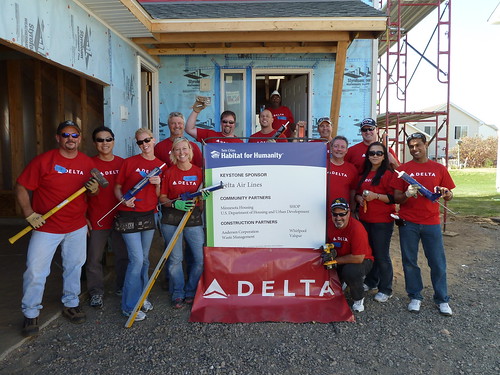
We assembled a crew again this year for a Habitat for Humanity build in Shakopee. This year we worked on insulation and the vapor barrier which made us all a little itchy at times 🙂 We had a great time together, lots of laughs, and most importantly we finished our job with time to spare. It was great to be working in the same neighborhood as last year because we were able to see the finished product and see the family that now lives there.

Click here to see the full photoset

Our killer crew
P1010989

Challenges of a ceiling
P1010972

Lunchtime
P1010969

Thanks Kim for pulling us together!
P1010978

Categories
Tech

R.I.P. Steve

As we all know Steve Jobs did great things for the technology we use today. We have lost a great visionary of technology.

My prayers go out to his family.

Categories
Friends Sports

NASCAR at Chicagoland Speedway

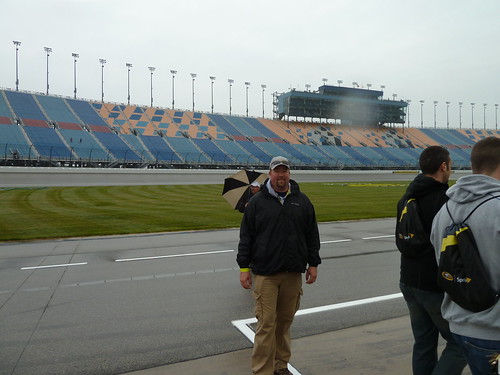
Last weekend I attended my first NASCAR race in Joliet, IL. Sean joined me and we took the camper down and camped at the track. It was great to meet others at the campsite and the races. Everyone was very kind, we were given tickets for the Friday night race, we were invited to the Miller Lite deck for a great track view and drinks, and given a pit tour. Sean was even in a Speed Network spelling contest on stage 🙂

The Sprint Cup race was pretty intense, cars were running out of fuel on the last lap and a bunch of cars fell out of the top 10. The roar of the cars is pretty awesome, much louder than I ever thought!

We had a great time and hope to make another trip next year with more friends.

Friday pictures|Saturday pictures|Sunday & Monday pictures

P1010862

On pit lane
P1010829

Sean and I getting setup after the drive to Joliet
P1010719

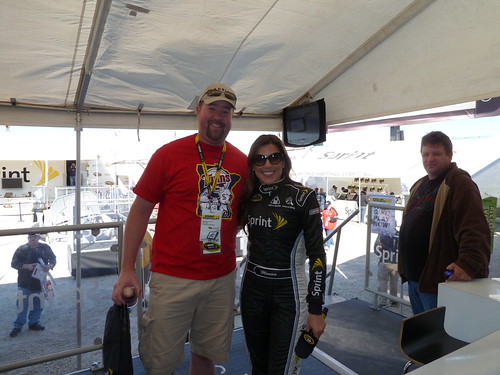
Hanging with Miss Sprint Cup
P1010761

Sean in the spelling contest
P1010793

The start of the Sprint race

Categories
Tech

Review if the Seidio 4000 mAh battery for the EVO 3D

Just as I did for my EVO 4G, I have purchased Seidio’s extended battery for the EVO 3D. With multiple push email accounts, phone usage, and applications updating in the background I enjoy having the extra capacity. I do not mind the extra bulk as my phone is a tool and not a fashion item.

This battery easily gets me through the busiest of days and even takes a beating on the airplane when I browse on GoGo WiFi and watch movies.

If you do not like to worry about battery swapping or having enough juice to get you through the day, this is a great purchase.

For those who like the size of the EVO 3D as is, there are other options such as Juice Defender which can double your battery life at the expense of turning off your data when the screen of the phone is off.

Categories
Tech

Rooted EVO 3D

Thanks to the Unrevoked and AlphaRev teams, I have a rooted EVO 3D! I can now take screenshots, use my phone as a hotspot, backup my data, and use custom ROM’s. I used the instructions on XDA. Which were pretty painless. For those that are not very excited about messing with their phone very much there are temporary root solutions out there that will allow for backups, screen captures, and hotspot access. I found it irritating that I needed a computer to execute the root process every time that I wanted to do something requiring root on my 3D.

It’s out there and available, give it a shot 🙂

Categories
Tech

EVO 3D review

I picked up my EVO 3D last Friday and have been enjoying my new device. I must say, I was not very excited about the 3D features of the phone but I have been having some fun. We went to the cabin over the weekend and I was using 3D to capture all kinds of fun pictures. Some of the pictures had some great depth to them.

As expected, the phone is faster than the EVO 4G, the screen resolution is a nice improvement and the new Sense 3.0 interface is greatly improved.

I look forward to gaining root access. HTC has said that they will unlock the bootloader on the 3D.

Pros:

  • Speed – everything is faster
  • New HTC Sense 3.0.
  • Screen  resolution – The screen looks crisp.
  • 3D is fun! Watching and recording movies in 3D, games, pictures, etc.
  • Dedicated camera button – makes taking pictures so much more stable.
  • 1GB of memory – I was constantly having to manage my memory on my EVO 4G, I do not have to do this anymore.
  • Ability to uninstall Sprint apps – dump the bloatware!
  • Weather animations are beautiful.
  • The power button is larger.

Cons:

  • 3D is great but if you do not have other 3D devices there is not much you can do beyond the EVO 3D.
  • Not OMLED – I still have Samsung screen envy.
  • Gmail does not yet support .mpo files – When I send 3D pictures to other EVO 3D friends there is no way to download the picture. It can only be “previewed” as a 2D picture. This can be resolved by configuring the HTC mail application for your account but that is not very user friendly.
  • The external speaker could be a little better.
  • I would prefer the micro USB connection at the bottom of the phone.
  • No kickstand (without a case) – I am surprised how many times that I have went for the kickstand and was reminded that I no longer have one.

Notes

  • Battery life is still much to be desired for myself as a power user. I look forward to Seidio releasing a 3,000+ mAH battery so that I can get through a day.
  • Gaps between the four rows of icons/widgets. With the higher resolution a fifth row can be beneficial. I am using Launcher Pro Plus which allows me to have five rows of icons.
  • Exchange support – unlike the previous HTC Sense devices, HTC has come clean about ActiveSync memory encryption for Sense 3.0. I cannot configure my EVO 3D to work with with my Exchange server that has this requirement. From what I understand, this is supported in Honeycomb 3.1 and I assume will work with Ice Cream Sandwich.
  • HTC has made the 2D/3D picture taking and sharing pretty effortless. When sending 3D pictures the phone will prompt to convert to 2D or ask to share either 2D or 3D depending on which application the picture is being shared to.

In conclusion, no phone is perfect. The 3D is a nice upgrade from the EVO 4G. I only hope that HTC starts rolling out phones with OMLED AMOLED screens by the time that I am eligible for my next upgrade 🙂

Categories
Tech

Groove IP and Android allows for unlimited calling

A few of us at the office have been wondering about options for using our cell phones for calls without using minutes on our plans for conference calls, etc. When I travel, I do not have a desk phone to use so the minutes add up quickly. For those that do not have a “Fav 5” T-Mobile like feature on their cell phone plan I have found that Groove IP works pretty well. For a one time purchase of $4, calls can be made using a data connection leveraging Google’s VOIP capabilities offered in Google Talk/Voice,

The application is pretty simple to setup. It is configured with your Google account credentials and then makes a connection. The application has three options for calling:

  1. Intercept outbound calls being made and route them though the Groove IP application.
  2. Prompt every time an outbound call is made, “Normal Call” or “Call using Groove IP”.
  3. Disabled.

Pictured below is the simple dialer that can be used for calls from Groove IP.

My testing of this application started with a 3G connection on my EVO 3D. My test call went downhill quickly and the person on the other end complained that they could not hear me. I hung-up and called back with 4G and had only a little complaint about echoing back to the person on the other end. I was worried about conference calls when I was told this and tested the mute functionality which stopped the echoing.

This solution is not perfect but will allow me to call into long conference calls without needing to worry about my usage. A decent solution as long as you have the bandwidth and hopefully Google’s call quality improves over time.

For those with a “Fav 5” or “Calling circle” calling option, if a person adds their Google Voice number to their free calling numbers, Google Voice Callback is a great solution. It allows you to make calls where Google Voice calls you back with your Google Voice number to connect the call.

Categories
Friends Sports

Team building and baseball

A few of our IT teams attended the Braves game yesterday. It was great to get out of the office with everyone!

I must say, not having a parking lot for tailgating at the Twin’s games is a bummer!

View all the pictures here

P1040882